Provenance
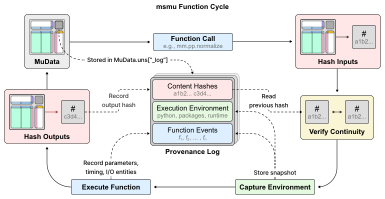
msmu records supported processing calls in mdata.uns["_log"]. The history stays
with the MuData object and its .h5mu file, so processing steps can be inspected,
exported, and replayed from the original inputs.
See the Verification tutorial for event inspection, replay, script export, and environment setup examples.
Recorded information
Each completed call records:
- The function and its parameters, including defaults.
- Input and output references and content hashes.
- Execution times and the Python/package environment.
Before executing a function that records provenance, msmu compares the input
MuData hash with the output hash from the previous recorded step. A mismatch
produces an msmu warning that the data have changed outside the recorded workflow;
the function still runs.
Content hashes
The current hashing policy, msmu-v2, uses SHA-256 and retains up to
12 significant digits of floating-point values when computing hashes.
It covers all MuData content except the provenance log.
Hashing is enabled by default, but during exploratory analysis or repeated parameter changes, you can turn hashing off to skip input/output hash calculations. This can reduce runtime and temporary memory use, especially for large data objects. Function calls, parameters, execution times, and environments are still recorded, but steps recorded without hashes cannot be verified by replay.
import msmu as mm

# Temporarily disable hashing for a separate result.
with mm.pv.options(hashing=False):
    unverified = mm.pp.scale_data(mdata, modality="psm")

# Disable hashing for subsequent processing calls.
mm.pv.set_options(hashing=False)
Execution environment
Environment records include Python and installed package versions, OS and
architecture, available msmu source information, and numerical runtime settings.
The recorded package/source information is cached on the first recorded call in a Python process. Restart Python to refresh this information after changing packages or source code.
Numerical runtime settings are checked at the start of each recorded function call. New configurations are stored as separate environment records.
The recorded Python and package versions can later be exported with
mm.pv.to_env() as requirements.txt or environment.yml.
Function events
Each recorded call creates a function event linking the function and its parameters to the execution environment and input/output references. Parent-event links connect the event to the steps that produced its inputs, preserving data lineage across branches and merges.
Replay
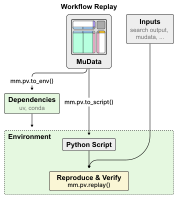
The history stored in a MuData object connects the original inputs to the recorded
processing steps and their results. mm.pv.replay() uses
this history to rerun supported workflows with the recorded parameters. It verifies
input and output hashes at each step, allowing you to check whether the rerun
reproduces the recorded data states.
For a workflow that can be reviewed, shared, or adapted,
mm.pv.to_script() generates an editable Python script
from the same history. The script contains the recorded processing calls and can
verify their results against the original hashes. It can also serve as a starting
point for changing inputs or analysis parameters.
To help prepare the software environment for reproduction,
mm.pv.to_env() exports the recorded Python and package
versions as requirements.txt or environment.yml. These specifications can be used
alongside the script and original input data to set up and rerun the analysis.